

Download this tutorial as a Jupyter notebook
Working with Multimodal Data#
Use NeMo Guardrails with vision-capable models to perform safety checks on image content. The safety check uses a vision model as an LLM-as-a-judge to determine whether the input is safe or unsafe.
The tutorial uses the Meta Llama 3.2 90B Vision Instruct model for the main LLM and as the judge model. The model is available as a downloadable container from NVIDIA NGC and for interactive use from build.nvidia.com.
About Multimodal Data#
You can configure guardrails with multimodal data and vision reasoning models to perform safety checks on image data. You can apply the safety check to either input or output rails. The image reasoning model acts as an LLM-as-a-judge to classify content as safe or unsafe.
The OpenAI, Llama Vision, and Llama Guard models can accept multimodal input and act as a judge model. Depending on the image reasoning model, you can specify the image to check as a base64 encoded data or as a URL.
Prerequisites#
Before you begin, make sure:
You have access to a running NeMo Microservice Platform that has one available GPU.
You have stored the NeMo Microservices Platform base URL in the
NMP_BASE_URLenvironment variable.You have an NGC API key (export as
NGC_API_KEY) - required for accessing private NGC repositories or when your cluster needs authentication to pull images.
This tutorial uses the following NIMs and includes instructions to deploy them via the Inference Gateway. If you do not have access to GPUs, refer to the instructions in Using an External Endpoint.
mainmodel:meta/llama-3.2-90b-vision-instruct.
Step 1: Configure the Client#
Install the required packages.
pip install -q nemo-microservices
Instantiate the NeMoMicroservices SDK.
import os
from nemo_microservices import NeMoMicroservices

sdk = NeMoMicroservices(base_url=os.environ["NMP_BASE_URL"], workspace="default")
Step 2: Deploy the Vision Model#
Deploy the Llama 3.2 90B Vision Instruct model using the Models Service and Inference Gateway.
vision_config = sdk.inference.deployment_configs.create(
    name="llama-3-2-90b-vision-config",
    description="Llama 3.2 90B Vision Instruct deployment config",
    nim_deployment={
        "image_name": "nvcr.io/nim/meta/llama-3.2-90b-vision-instruct",
        "image_tag": "1.1.1",
        "model_name": "meta/llama-3.2-90b-vision-instruct",
        "gpu": 1,
    },
)

sdk.inference.deployments.create(
    name="llama-3.2-90b-vision-deployment",
    config=vision_config.name,
)
Step 3: Create a Guardrail Configuration#
Create a guardrail configuration that uses the vision model for both the main model and the content safety model. This example applies the safety check as part of the input rails.
guardrails_config = {
    "models": [
        {
            "type": "main",
            "engine": "nim",
        },
        {
            "type": "content_safety",
            "engine": "nim",
            "model": "default/meta-llama-3-2-90b-vision-instruct",
        },
    ],
    "rails": {
        "input": {
            "flows": [
                "content safety check input $model=content_safety",
            ]
        }
    },
    "prompts": [
        {
            "task": "content_safety_check_input $model=content_safety",
            "content": "You are a safety judge for image content. Review the image and the user question and respond with JSON: {\"decision\": \"safe\" or \"unsafe\", \"reason\": \"short explanation\"}.",
            "max_tokens": 100,
        }
    ],
}

config = sdk.guardrail.configs.create(
    name="multimodal-guardrails-config",
    description="Multimodal guardrails for image safety",
    data=guardrails_config,
)
Step 4: Verify a Safe Image#
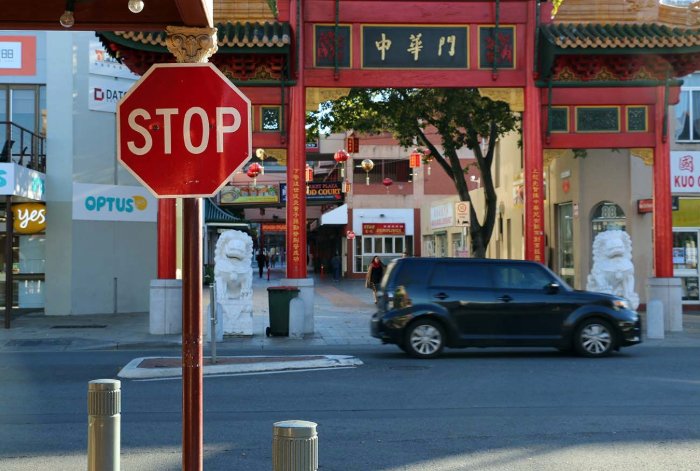
Download an image of a street scene, street sign, or other safe image. You can use a website such as https://commons.wikimedia.org/wiki/Main_Page or download the street-scene.jpg.
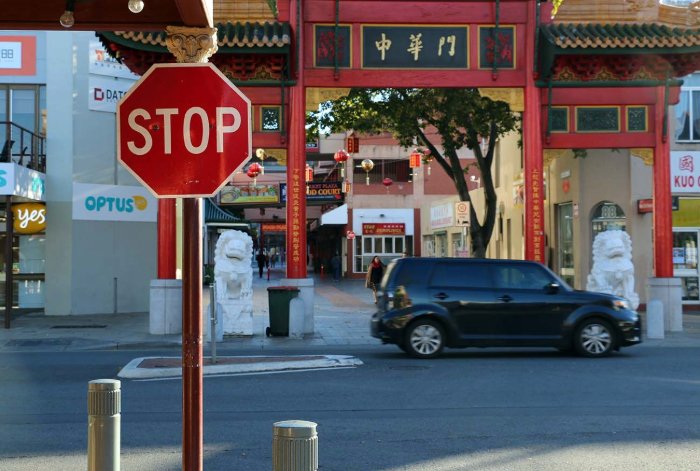
Save the image as
street-scene.jpg.Encode the image as a base64 string. Send a request to the model through the Guardrails chat completions API with the image:
import base64

with open("street-scene.jpg", "rb") as f:
    image_b64 = base64.b64encode(f.read()).decode("utf-8")

response = sdk.guardrail.chat.completions.create(
    model="default/meta-llama-3-2-90b-vision-instruct",
    messages=[
        {
            "role": "user",
            "content": [
                {"type": "text", "text": "Is this image safe?"},
                {
                    "type": "image_url",
                    "image_url": {
                        "url": f"data:image/jpeg;base64,{image_b64}"
                    },
                },
            ],
        }
    ],
    guardrails={"config_id": "multimodal-guardrails-config"},
    max_tokens=200,
)

print(response.model_dump_json(indent=2))
Output
{
  "id": "chatcmpl-6e6ee35f-87be-4372-8f3d-f4f0c61f51db",
  "object": "chat.completion",
  "model": "meta/llama-3.2-90b-vision-instruct",
  "choices": [
    {
      "index": 0,
      "message": {
        "role": "assistant",
        "content": "The image appears safe."
      },
      "finish_reason": "stop"
    }
  ]
}
Step 5: Verify a Potentially Unsafe Image#
Send a request using an image depicting car audio theft:

response = sdk.guardrail.chat.completions.create(
    model="default/meta-llama-3-2-90b-vision-instruct",
    messages=[
        {
            "role": "user",
            "content": [
                {"type": "text", "text": "Is this image safe?"},
                {
                    "type": "image_url",
                    "image_url": {
                        "url": "https://upload.wikimedia.org/wikipedia/commons/thumb/2/27/Car_audio_theft.jpg/960px-Car_audio_theft.jpg"
                    },
                },
            ],
        }
    ],
    guardrails={"config_id": "multimodal-guardrails-config"},
    max_tokens=200,
)

print(response.model_dump_json(indent=2))
Output
{
  "id": "chatcmpl-3f3f3d2e-2caa-4f89-9a46-8c2b2d0b1f8c",
  "object": "chat.completion",
  "model": "meta/llama-3.2-90b-vision-instruct",
  "choices": [
    {
      "index": 0,
      "message": {
        "role": "assistant",
        "content": "I'm sorry, I can't respond to that."
      },
      "finish_reason": "stop"
    }
  ]
}
Cleanup#
sdk.guardrail.configs.delete(name="multimodal-guardrails-config")
print("Cleanup complete")