

Guardrails Architecture#
Use NeMo Guardrails to add safety checks and content moderation to a large language model (LLM).
How NeMo Guardrails Interacts with LLMs#
NeMo Guardrails places NemoGuard NIM microservices between your application and the application’s LLM. By configuring guardrails for your use case, you can add safety checks and content moderation to your LLMs.

A single NeMo Guardrails instance can serve multiple applications and help manage multiple guardrail configurations and LLMs. NeMo Guardrails can call both internal and external LLMs, so you can guard models inside or outside the NeMo microservices cluster.
To check user inputs and LLM outputs, configure your application to use the NeMo Guardrails inference endpoint instead of the LLM endpoint.
In each guardrail configuration, you can specify the LLM used for generation, the NemoGuard NIM microservices for input and output checks, and the guardrail policies applied to those checks.
The following architecture diagram shows NeMo Guardrails as a central hub, routing requests to models and services for tasks like content safety and topic control. It also shows how the platform interacts with both internal and external clusters.
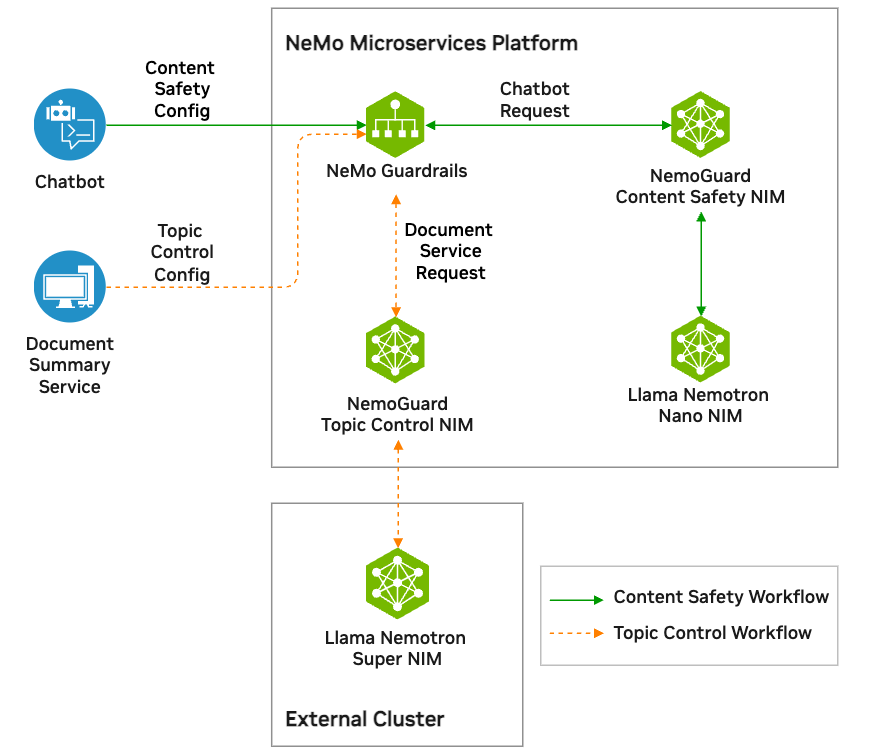
The diagram starts with a Chatbot and a Document Summary Service on the left.
The Chatbot sends a Chatbot Request with a Content Safety Config to NeMo Guardrails.
The Document Summary Service sends a Document Service Request with a Topic Control Config to NeMo Guardrails.
Inside the NeMo Microservices Platform, NeMo Guardrails is the central component.
The solid green arrows representing the Content Safety Workflow flows from NeMo Guardrails to the NemoGuard Content Safety NIM. At this stage, the NemoGuard Content Safety NIM is responsible for checking the content safety of the user input. If input passes the check, the Llama Nemotron Nano NIM receives the input and generates an output. The Content Safety NIM then checks the output from the Llama Nemotron Nano NIM. If the output passes the check, the output is sent back to the Chatbot user. If the input or output fails the check, the output is sent back to the Chatbot user with a message indicating that the output failed the check.
The dashed orange arrows representing the Topic Control Workflow flows from NeMo Guardrails to the NemoGuard Topic Control NIM. At this stage, the NemoGuard Topic Control NIM is responsible for checking the topic safety of the user input. If input passes the check, the Llama Nemotron Super NIM in the external cluster receives the input and generates an output. The Topic Control NIM then checks the output from the Llama Nemotron Super NIM. If the output passes the check, the output is sent back to the Document Summary Service using the original request and output. If the input or output fails the check, the output is sent back to the Document Summary Service with a message indicating that the output failed the check.
Tutorials#
Use the following tutorials to learn how to accomplish common guardrail tasks using NeMo Guardrails.
Tutorials for common guardrail tasks. This is using the Helm installation to get you prepared for production setup.
API Usage Guides#
The following guides cover common guardrail operations using NeMo Guardrails APIs with the NeMo Microservices Python SDK.
Check content with input and output guardrails.
Run inference and apply safety checks.
Create and manage guardrail configurations.